
Overview
The Macaulay Library and eBird maintain the world's largest archive of biodiversity media. Photos, audio recordings, and video submitted to eBird checklists function as scientific evidence of species appearance, plumage and molt, behavior, distribution, habitat use, and more, with media from the archive having been used in hundreds of scientific papers. This archive also trains identification tools such as Merlin Photo ID and Merlin Sound ID, so the accuracy of submitted media directly affects the accuracy of those tools.
Recent advances in artificial intelligence (AI) tools have made it substantially easier to add, remove, or invent biological detail in a photo, often without the contributor realizing it. AI-assisted "enhancement" tools and image generators can fabricate plumage, alter anatomy, or remove diagnostic features while appearing simply to sharpen or clean up an image. Because these tools operate as a black box, with little visibility into what is actually being changed, media processed this way cannot be relied on as documentation. Below is eBird and the Macaulay Library’s policy addressing AI-generated and AI-altered images, and note that iNaturalist has adopted a similar policy on its platform.
Media must faithfully represent the organism, sound, or environment as it appeared at the time of documentation. This applies regardless of the editing tool used, including traditional editing software and AI, and to photos, audio, and video alike.
Quick Guide
Do not upload images, audio, or video generated by AI
Do not use AI tools, including "enhance" features and AI chatbots, to alter media before upload
Standard adjustments for photos, such as cropping, adjustments to exposure and color balance, and moderate sharpening or noise reduction, are acceptable
Non-compliant media may be labeled Over-edited or Artificial
Repeated or willful violations may result in restrictions on the account
Acceptable Photo Editing
The following types of edits are acceptable on photos submitted to eBird and the Macaulay Library:
Cropping and straightening
Standard adjustments to exposure, contrast, color, white balance, and lens correction
Moderate sharpening and noise reduction (including AI-assisted noise reduction at very low levels that do not invent new detail)
Removal of sensor dust, scratches, or lens artifacts
Focus stacking and multi-exposure blending (HDR)
Uploading blurry or low-resolution media as-is
A photo that is imperfect but unaltered is always preferable to one that has been artificially clarified or completed. Also, please always strive to use workflows that maintain accurate EXIF metadata on your edited or exported photos. This will become increasingly important in the future as we may need to use it to verify authentic images.
Not Acceptable Photo Editing
The following are not acceptable under any circumstances:
Generative fill, object removal, or object addition affecting the animal, its perch, or its surroundings (including removal of branches, leaves, or other objects that may block the subject)
Replacing the sky or background
AI "enhance" tools or AI chatbots used to reconstruct or reinterpret image detail
Cloning or stamping, other than removal of minor dust or sensor artifacts
Sharpening, saturation, or contrast adjusted beyond a natural appearance
Fully AI-generated images, including images generated to represent an observation for which no photo was taken
Each of these can introduce or remove biological detail that was not part of the original observation, regardless of whether the contributor intended to alter it.
Other Media Types
Video
The same standard applies to video. Trimming, stabilization, and standard color and exposure correction are acceptable. AI-driven frame interpolation, generative clean-up, object removal, and synthetic reconstruction of footage are not acceptable.
Audio
The same standard applies to audio. Normalization and light high pass filters or EQ are acceptable. Noise reduction of any kind, heavy filtering, and synthetic or reconstructed sound are not, since they can alter or erase the diagnostic qualities of a vocalization. Recordings found to edited beyond acceptable guidelines may receive the Over-edited tag, and upload of less processed version and modification to less invasive workflows in the future is recommended.
Examples
The examples below illustrate common categories of non-compliant media, along with a contrasting example of acceptable documentation. Additional annotated examples will be added over time.
Example: Over-editing without AI
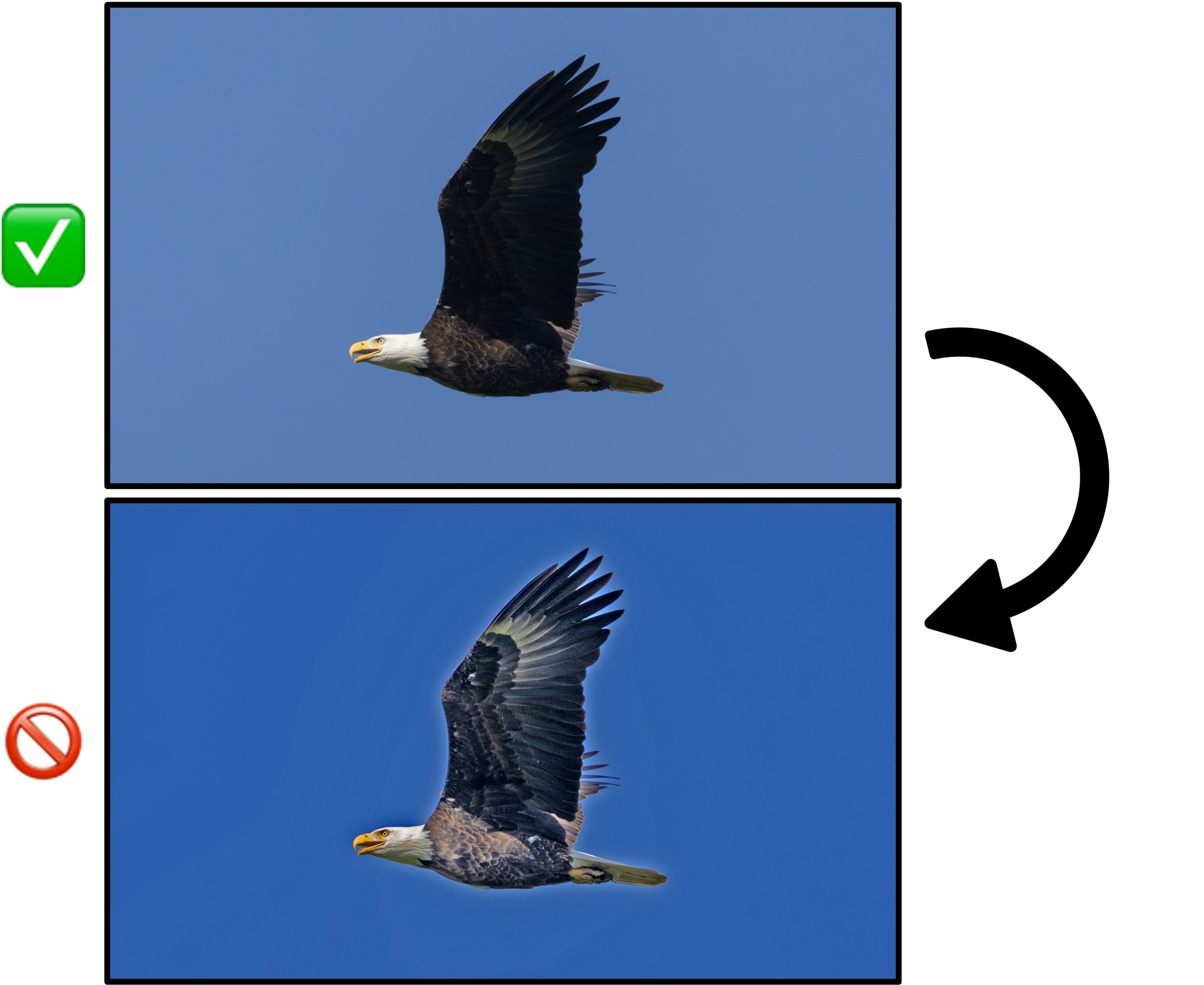
A Bald Eagle photo with shadows pushed to an extreme setting, altering the apparent color of its feathers and giving the bird an unnatural overall appearance. Aggressive use of any single adjustment, such as shadows, sharpness, or brightness, carries a high risk of producing a misleading image even without AI involvement. The second image would receive the Over-edited tag in Macaulay Library.
Example: Over-editing with AI tools
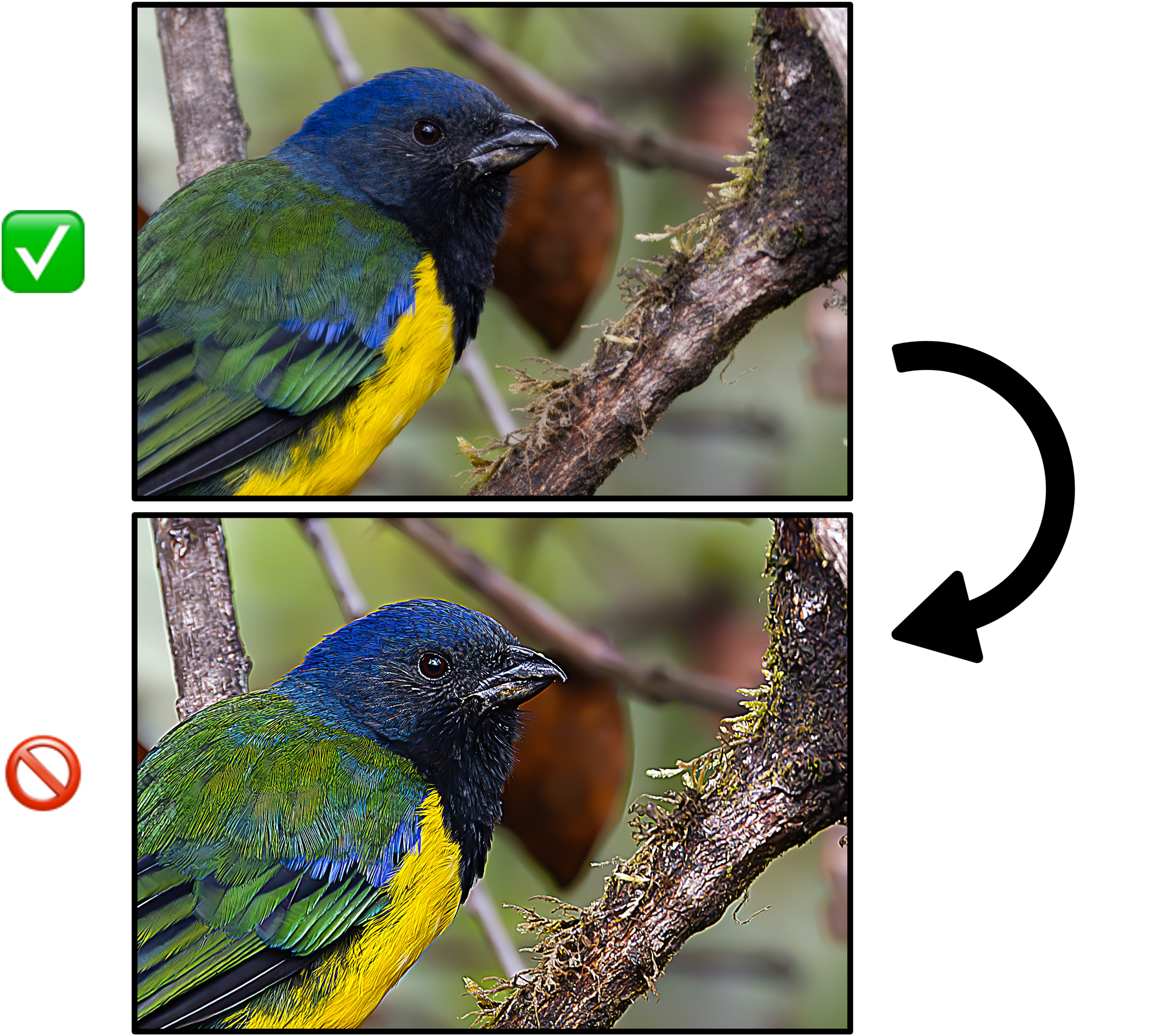
An increasingly common issue seen in many uploaded photos, where AI sharpening and denoise tools are being extremely overused, altering the appearance of this Black-chested Mountain Tanager by adding in false detail to the bird’s feathers and beak as well as the branch it’s perched on, causing them all to appear very unnatural. Users should never overapply any settings during editing, like shadows, sharpness, and brightness, as turning any slider up to the max has a high likelihood of making the bird appear unnatural, and even default levels of AI denoise are likely to introduce fake details. The second image would receive the Over-edited tag in Macaulay Library.
Example: Over-editing by AI upscaling
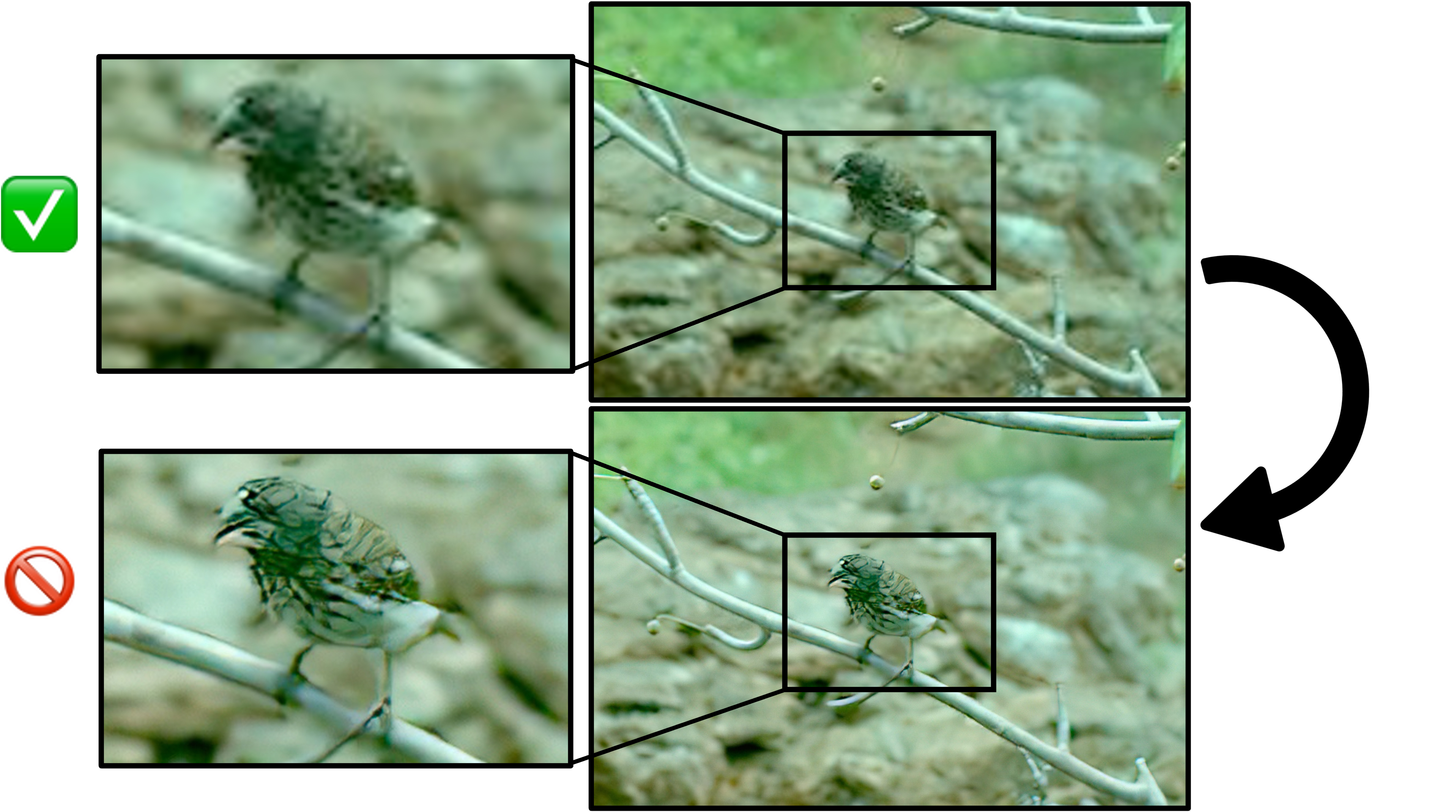
A low-resolution photo of a Large Ground-Finch, and a separate version of the same image run through an AI upscaling tool. The upscaled version smooths out real feather detail into a texture resembling a painting rather than a photograph. The original, unaltered low-resolution image is acceptable documentation on its own; the upscaled version is not, because it fabricates detail that was not actually captured. The second image would receive the Over-edited tag in Macaulay Library.
Example: AI "enhancement" altering biological detail
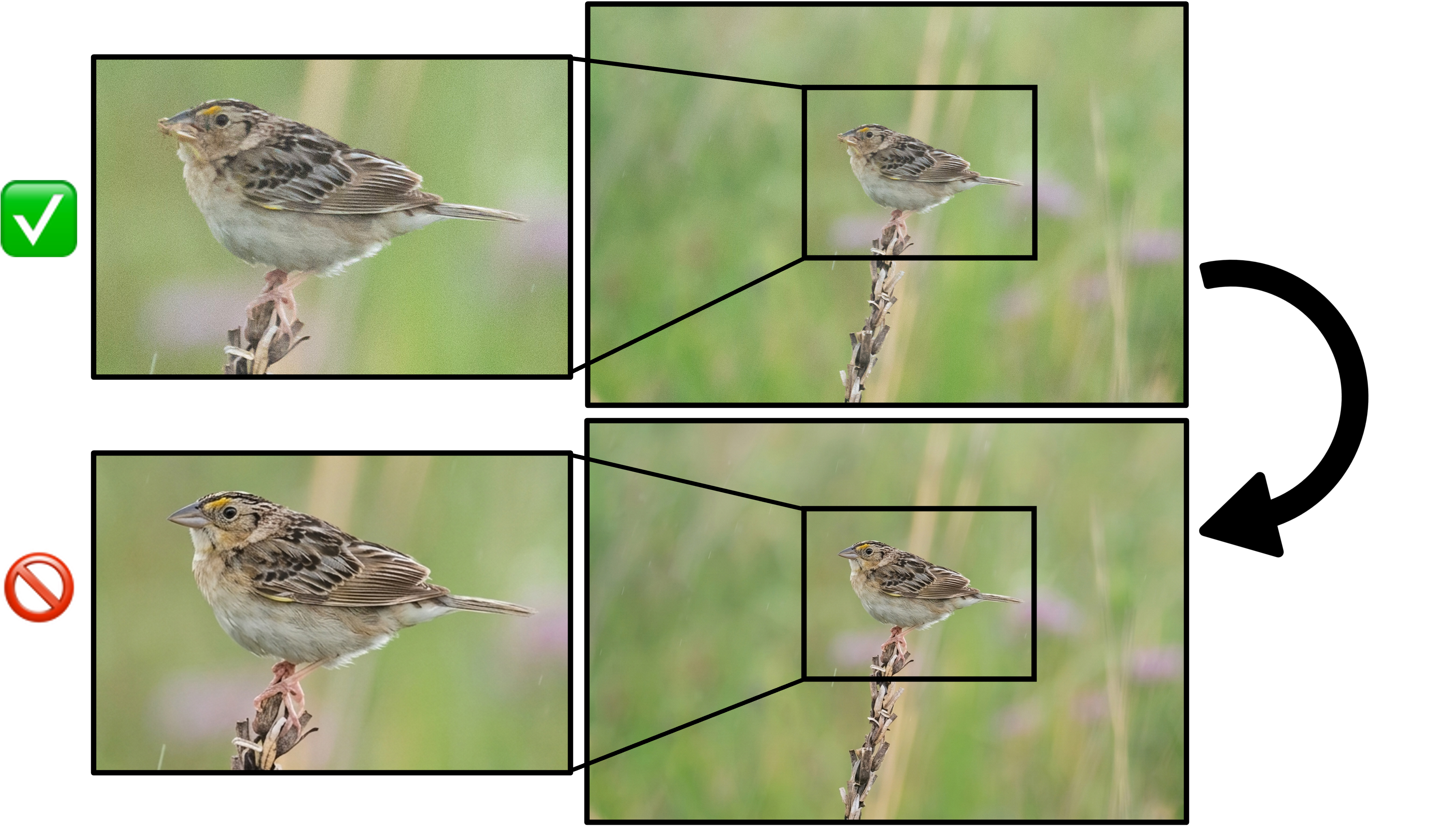
An original photo of a Grasshopper Sparrow and a version of the same photo processed with an AI enhancement tool. The processed version removes food visible in the bird's bill, generates a fake lower bill in its place, and adds a dark malar stripe that many sparrows show, but Grasshopper Sparrows do not have. The changes are easy to miss at a glance but alter plumage and structural information that the original photo correctly documented. The second image would receive the Artificial tag in Macaulay Library, but could be very hard for curators to detect.
Example: AI Denoise/Sharpening taken too far
If used in excess (including at default thresholds for many tools!), AI denoise can introduce details that were not present in life, as well as create an "over-smoothed" look to a photo.
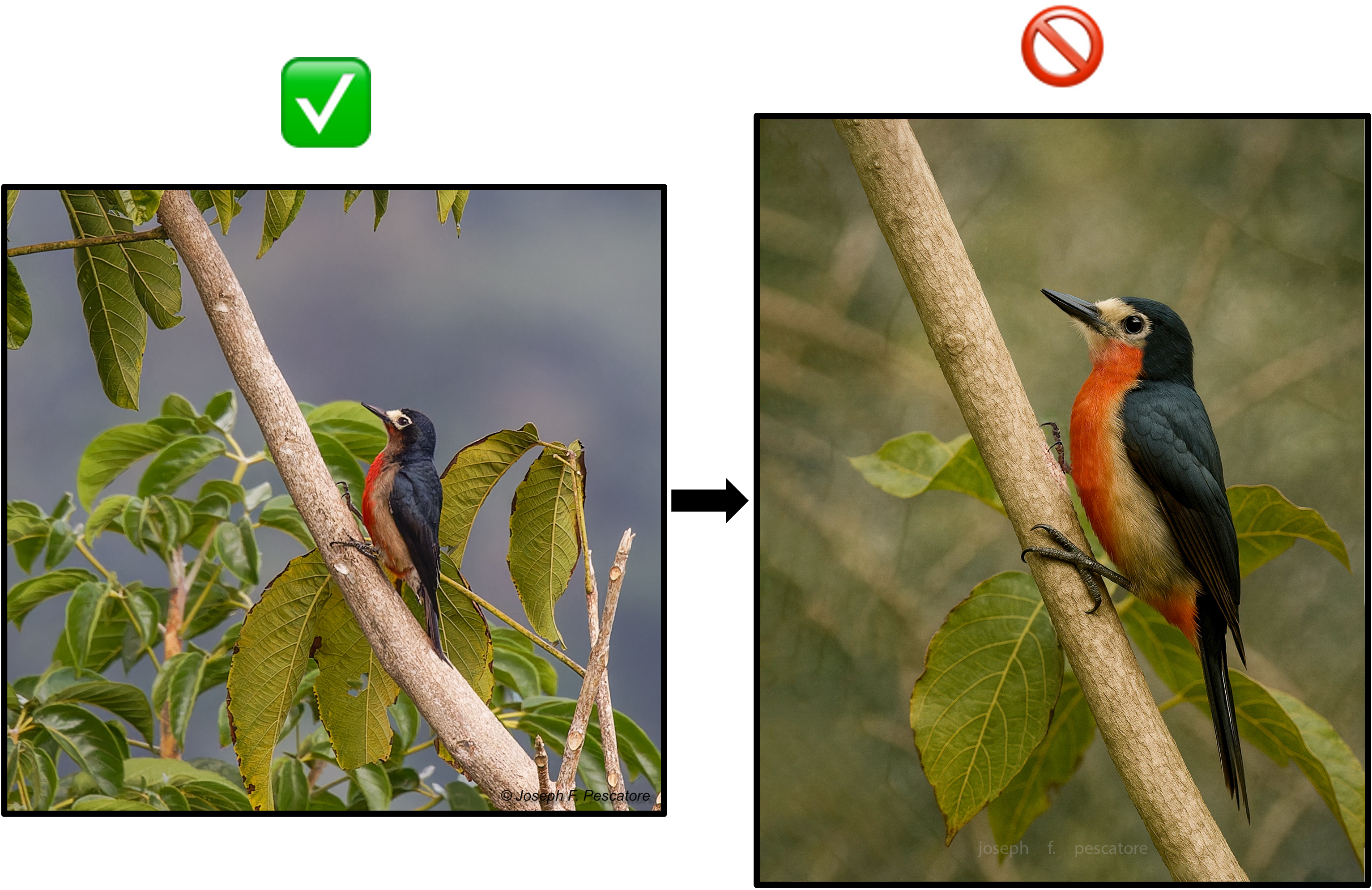
Example: Fully AI-generated image based on a reference photo
A reference photo of Puerto Rican Woodpecker submitted alongside a fully AI-generated image intended as a clearer version of the same bird. The generated image alters the plumage, posture, and habitat shown in the original. The reference photo is acceptable, well-documented evidence on its own; the generated image is not acceptable at any resolution or quality level and would receive the Artificial tag.
Example: Fully AI-generated image with no reference photo
An AI-generated image uploaded in place of a photo, intended to depict what the contributor believed they saw. Media of this kind is not acceptable under any circumstances and would receive the Artificial tag. A written description or a field sketch made at the time of observation should be used instead when a photo was not obtained.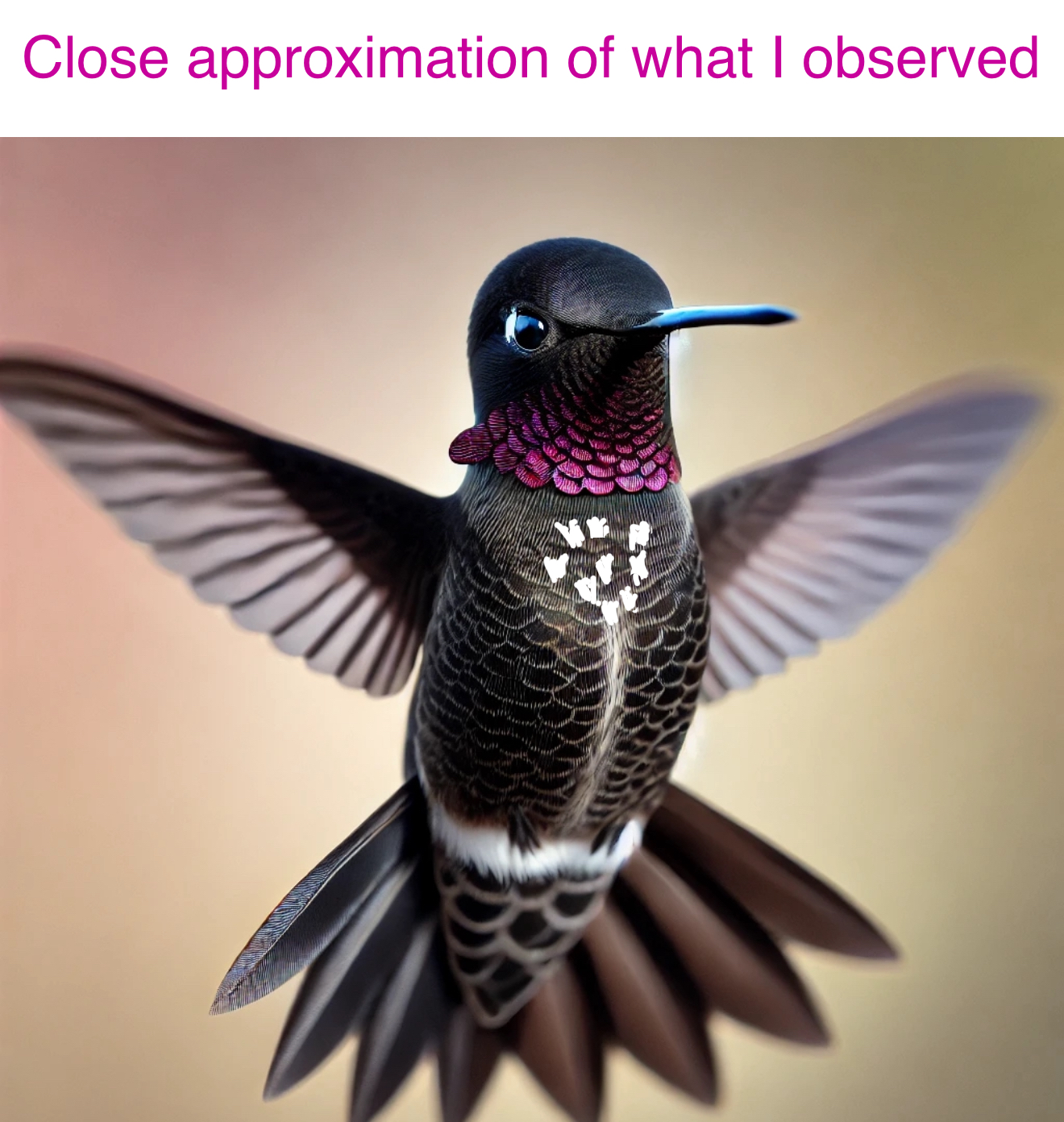
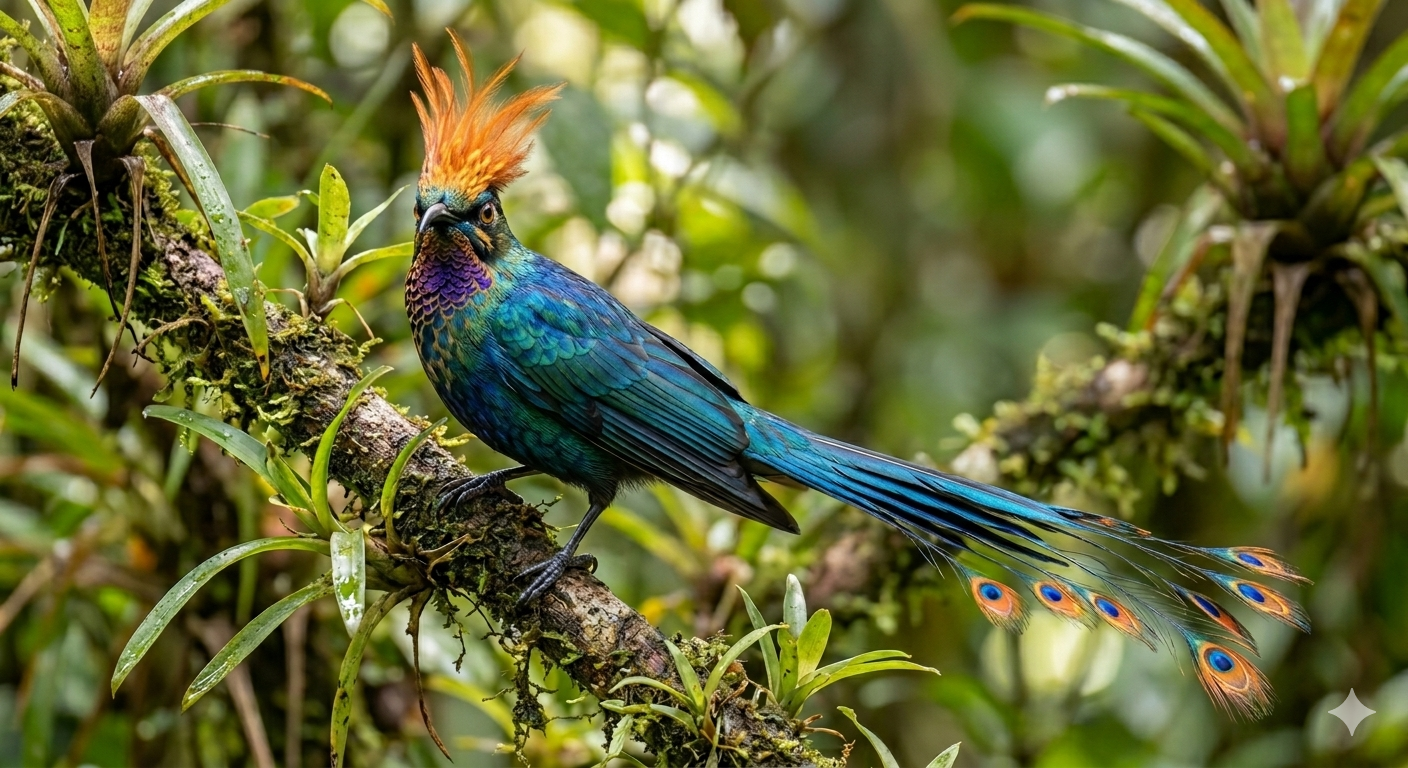
Example: Fully AI-generated bird based on a prompt
AI can create photo-realistic images depicting birds not even close to anything that exists in reality. This has already proven to be extremely problematic on many social media “photography” accounts. This could become a growing problem (albeit hopefully a more easily diagnosable one, for now at least) on eBird and Macaulay Library in the future.
Example: Fully AI-generated image potentially submitted as a rarity record
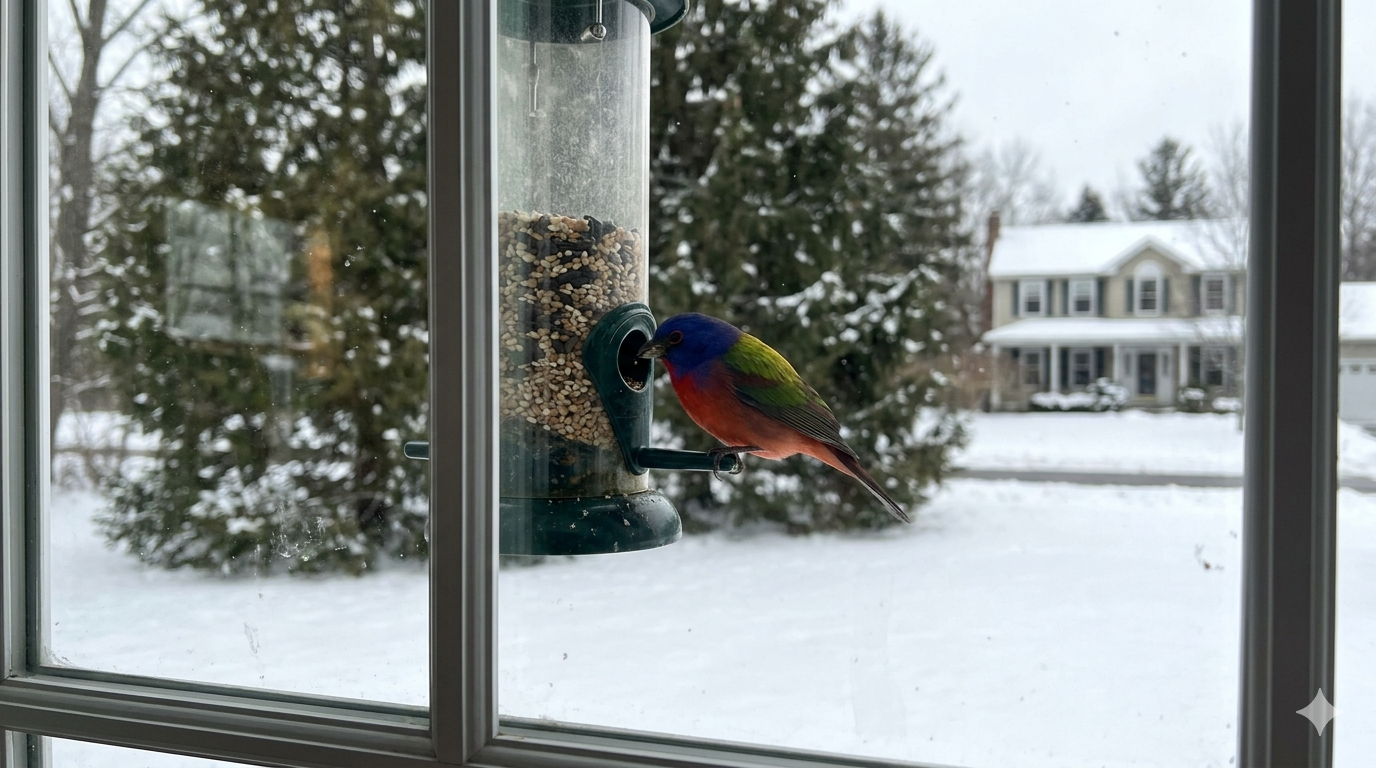
An AI-generated image of a Painted Bunting. Convincing AI-generated images can be difficult to distinguish from genuine documentation, which is why rarity records supported by such images are treated as falsified records. Repeated or intentional submission of fabricated documentation is treated as a serious violation of this policy, above and beyond the application of the Artificial tag.
Example: Comparison of multiple AI alterations affecting the species
Figure 1 from a recent article discussing this problem: “Citizen science platforms must mitigate against the threat of generative AI” (Lees et al. 2026)
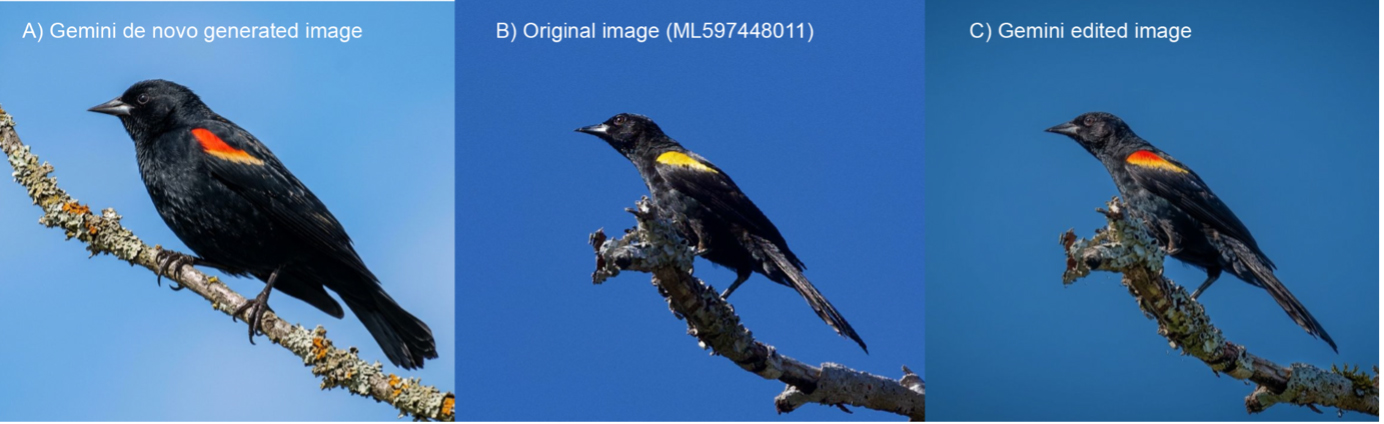
Figure 1. Large language model image generation and manipulation. A) Image produced by us with Gemini 3 (Google) using the prompt “Produce a photo-realistic image of a male Red-winged Blackbird, facing left sat on a thin lichen-covered branch as viewed from below as if taken with a 500 mm telephoto lens from a distance of 100 m. The bird is holding its tail down. The sky behind is bright blue.” This image is a convincing representation of a Red-winged Blackbird Agelaius phoeniceus (a common North American species) which has no obvious signs of being a ‘deepfake’ image - although it looks like it may have fewer than the expected 12 tail feathers. B) Image from the Macaulay Library (ML597448011) of an Epaulet Oriole Icterus cayanensis, a South American rainforest species, taken in Amazonian Brazil (photographer David Theobald). C) Manipulated image of ML597448011 produced by us with Gemini 3 (Google) using the prompt ‘make this look better’. When the original image B) of the Epaulet Oriole was edited by Gemini 3 to ‘improve’ its quality, it resulted in C) an image that almost perfectly resembles a different extralimital species which is not in the same genus - the Red-winged Blackbird - and would be expected to fool both expert ornithologists and computer vision image classifiers.
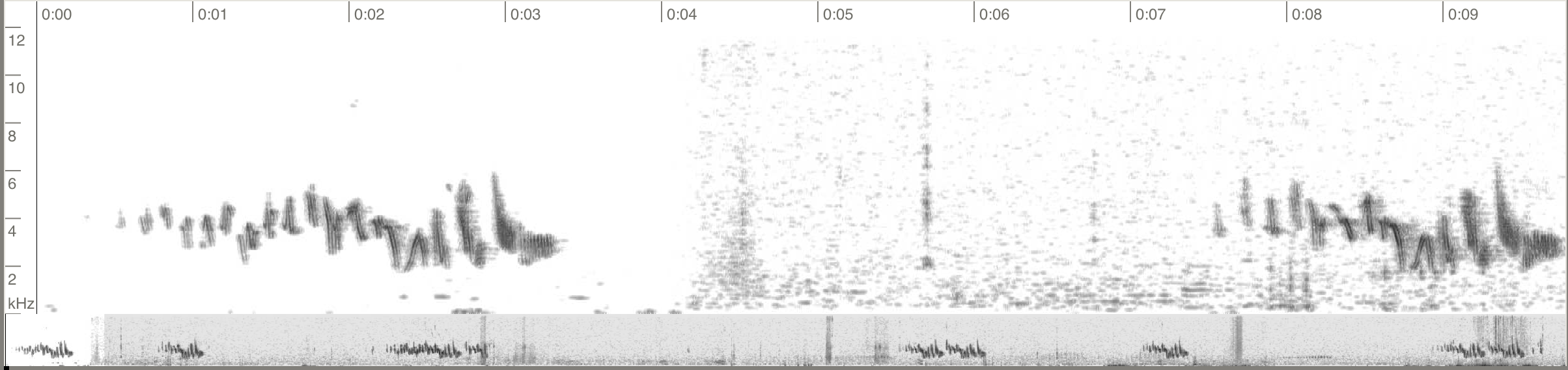
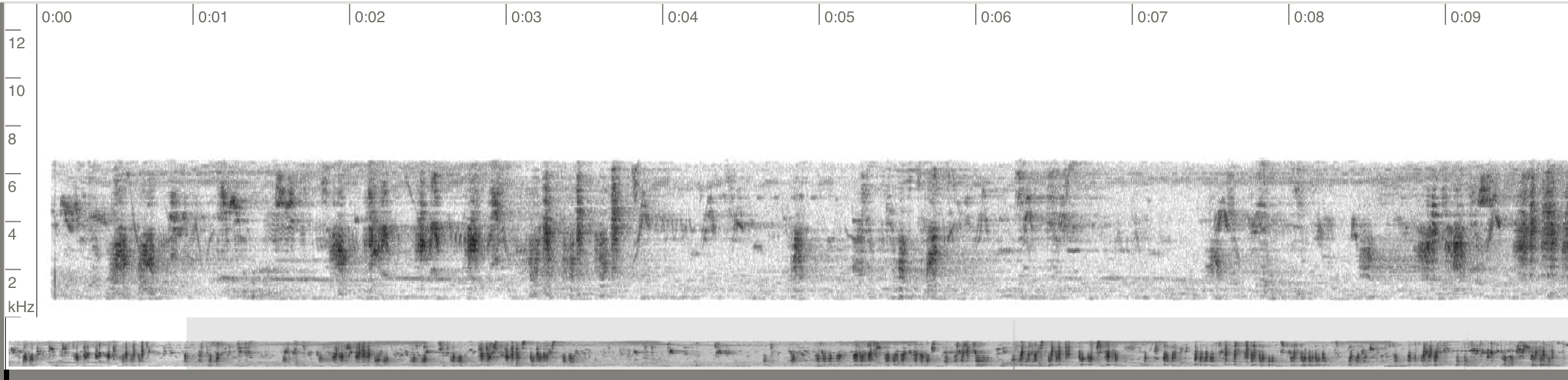
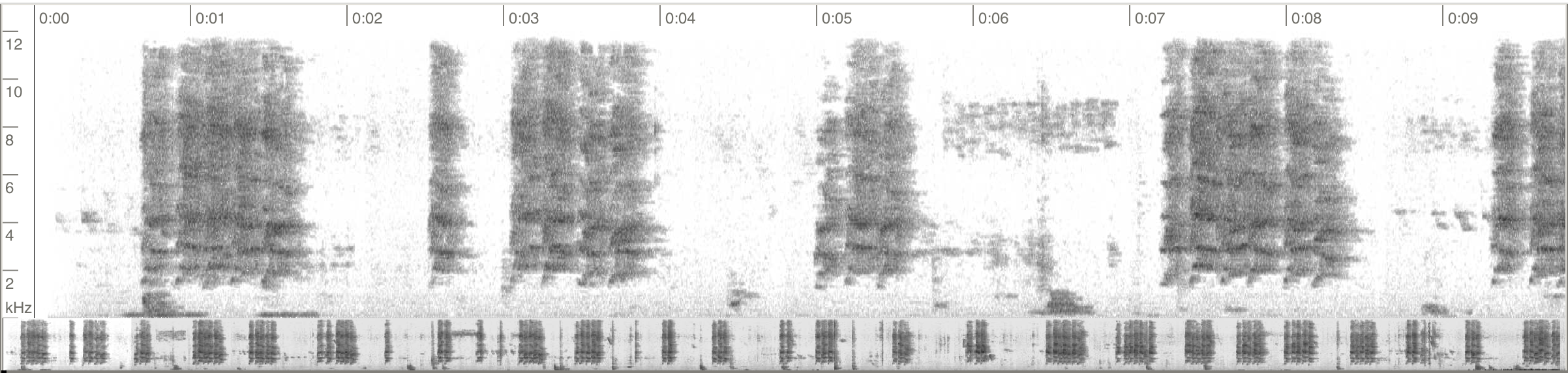
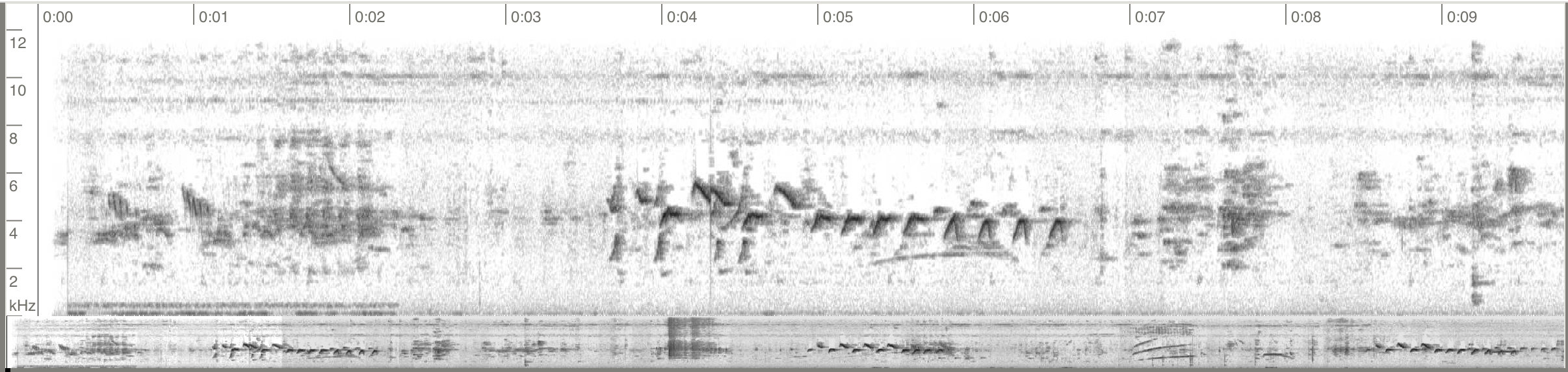
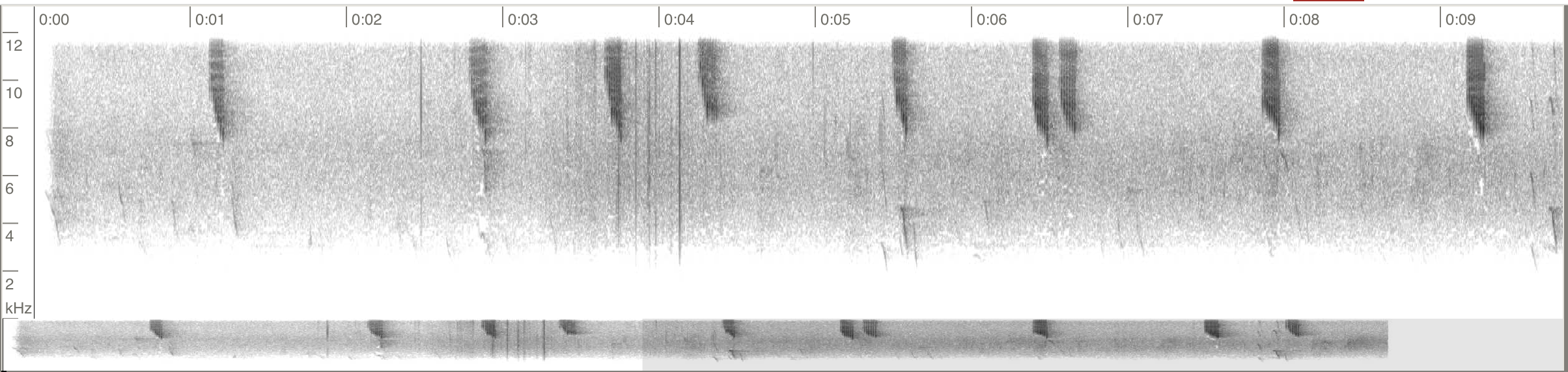
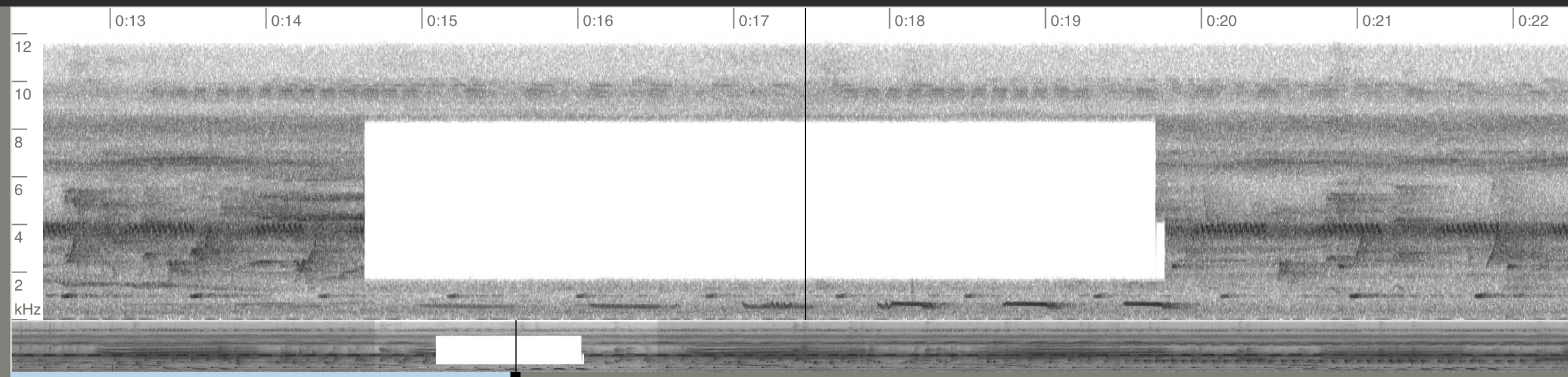
Example: Noise reduced and over-filtered audio recordings
Any type of noise reduction, AI or otherwise, is unacceptable and grounds for the Over-edited tag. Similarly, extreme filtering or removal of sections of audio is also against best practices. Unnaturally white background with odd blips and artifacts are often a side effect of extreme noise reduction.
Tags and Enforcement
Media that does not meet this policy will be labeled with one of two tags, applied by curators and reviewers, and typically will be accompanied by outreach to better educate the contributor on best practices. Tags applied to media alter their use in Explore tools and scientific output. In the future, we plan to provide a way for users to flag content that may require these tags.
Over-edited tag

Applied to real media edited beyond the limits described above. It may be applied to an over-sharpened photo or an artificially upscaled image, as well as audio that has been audibly noise-reduced or had extreme filters or other editing applied. The tag appears on the media in Media Search and on Specimen Pages, and the media remains public and searchable. The tag signals reduced scientific reliability and serves as feedback to the contributor, who is encouraged to replace the media with a less-edited version.
Artificial tag
Applied to media that is fully or substantially AI-generated, or edited so extensively that it no longer reliably depicts the organism, sound, or environment. Media labeled Artificial is removed from all public-facing outputs, including checklists, Specimen Pages, Media Search, and front-page or species-page feeds, and remains visible only to the contributor and Cornell Lab staff.
Escalation
Although the risks to the integrity of the Macaulay archive are severe, we also understand that these tools are evolving quickly and that users may not always be aware of the scale of the loss of important biological information that may occur with what might feel like normal image editing using AI tools.
The above tags are intended to better curate the archive and also to help make users aware when their media editing is problematic. A single instance of non-compliant media, corrected after outreach, would lead to no further consequences. However, users that receive multiple Artificial tags or show an unwillingness to correct those media, would be treated as a pattern rather than an isolated mistake and could result in escalating consequences, up to and including having the account's checklists and media made fully non-public.
In addition, we have a zero tolerance policy for intentional falsification of records submitted to eBird and/or the Macaulay Library. Intentional submission of falsified data and/or media has no place in our platforms and may lead to an account being set to Not Public in accordance with our Community Guidelines.
What can you do?
Never use generative AI of any kind to modify or “enhance” your media. Gemini, ChatGPT, Adobe Firefly, Stable Diffusion, and a host of other software should be avoided at all cost.
Only use editing tools mildly. Whether they are AI-powered or not, editing tools can be easily overused and create unnatural or misleading images and sounds. Use them sparingly and at low levels. For images, stick to cropping, and brightness and natural color adjustments, and avoid denoise, sharpening, or other tools likely to introduce artifacts. For audio, avoid any kind of noise reduction whatsoever, and only use filters at very low levels and sparingly.
Be aware of changes being made to your media, and check them for accuracy before uploading.
Learn to spot AI artifacts and think critically about other media you see. In the future when tools are built for community flagging, you may be able to flag suspicious media yourself.
If you see these editing tags on your own media, reconsider your editing workflow and think critically about what has been done to the original media. Consider uploading a less edited, more natural version.
FAQs
What should I do if I see a piece of media that is obviously AI generated or manipulated?
In the future, we hope to have more integrated tools to allow users to flag problematic or artificial media. In the meantime, if you see media that is extremely over-edited and especially that seems to show evidence of generative AI, you can bring it to the attention of curators by reporting it on this form.
What should I do if I see one of these tags on my own media?
Consider whether your workflows incorporate any of the practices listed above, and whether the resulting media is a good representation of the animal(s) in nature. If you did use AI tools or otherwise over-edited your media, the best option is to go back to the original and upload a less-edited, more natural version of the media.
If you think one of the above tags has been added in error, you can use this form to request re-evaluation.